

GxP Compliance in Microsoft 365
GxP-compliant collaboration

Microsoft 365 has long been established as a central platform for collaboration in regulated industries. At the same time, the question arises of how collaboration can be designed to ensure that GxP compliance requirements for data integrity, traceability, and governance are reliably met.
The abbreviation GxP refers to the collective term for all "Good Practice" guidelines. The "x" in the middle acts as a placeholder for various areas of application along the entire value chain of a product.
Originating in the pharmaceutical industry, GxP guidelines are now the gold standard in industries where safety and quality cannot be compromised - particularly in medical technology, biotechnology, and the food industry.
GxP Compliance in Microsoft 365: What Really Matters in the M365 Environment
Microsoft 365 (M365) has become the central platform for collaboration for many organizations. Tools such as Microsoft Teams, SharePoint, and OneDrive form the digital workplace - even in regulated industries such as life sciences, pharma, medtech, and healthcare.
Because GxP ("Good x Practice") aims to ensure patient safety, product and process quality, as well as data integrity, in everyday life, this becomes very concrete: it is about who is allowed to access which content, which information is considered a record, how long it must be stored - and how all of this can still be tracked even after changes, new teams or system adaptations.
This article identifies the most important aspects and outlines what matters in the Microsoft 365 environment, especially in the interplay among governance, lifecycle, and data management.
GxP Compliance in Microsoft 365: What Really Matters in the M365 Environment
GxP is a collective term for various "good practice" regulations, including:
- GMP (Good Manufacturing Practice)
- GCP (Good Clinical Practice)
- GLP (Good Laboratory Practice)
- GDP (Good Distribution Practice)
The common goal is to control processes, systems, and data so that quality, security, and integrity are reliably maintained.
Three principles are particularly relevant in the M365 context:
- Intended use & risk assessment
Not every use of Microsoft 365 is automatically GxP-critical. The decisive factor is the specific use case and the impact that errors or manipulations would have on quality, security, or regulatory evidence. - Traceability
In GxP contexts, it must be possible to prove who created, changed, released, or deleted content - and whether this was done in a controlled manner. - Data integrity over the lifecycle
Data integrity is not a purely technical property. It arises from the interaction of clearly defined processes, roles, controls, and documented evidence - especially in collaborative environments.
In everyday life, the implementation of these principles can be seen in very specific issues. Typical GxP-relevant issues relate in particular to:
- Accesses and authorizations incl. reviews
- Changes and logging incl. audit readiness
- Records, retention, and archiving
- Standardization of Teams and SharePoint sites and their lifecycle
- Lifecycle management of workspaces
GxP Compliance in the M365 Environment: Responsibility in the SAAS Model
Cloud platforms such as Microsoft 365 offer advantages such as standardization, scalability, and rapid availability. At the same time, the model is based on "software as a service": the provider operates the platform, while responsibility for its use in a regulated context remains with the company.
In practice, this results in a shared responsibility model that is central to GxP compliance.
While the vendor provides infrastructure, operations, and security functions, organizations must perform vendor evaluation, define permitted M365 use, establish baseline configurations and governance rules, and establish review, change, training, and documentation processes, among other things.
GxP Compliance in the M365 Environment: Implementation in Operations
With this in mind, the question arises as to how these requirements can be implemented in actual operations.
A pragmatic start begins with the question of which use cases are actually GxP-relevant or GxP-related. This is less about individual tools and more about content and decisions. Typical examples are:
- Quality assurance documents (e.g. SOP drafts or review processes)
- Validation documents, test protocols, or deviations
- Project communication with influence on quality-relevant decisions
- Collaboration with external partners such as CROs, service providers, or auditors
The decisive factor is which content requires additional checks and verifiable evidence.
Shared responsibility and supplier verifications
In cloud operations, the provider takes over the technical infrastructure and security functions, while governance, authorizations, and processes must be defined and controlled by the company. This results in the following tasks, among others:
- Conducting a supplier assessment
- Definition of which M365 services may be used in the respective scope
- Determination of baseline configurations and governance rules
- Establishment of review and change processes
Identities, roles, and access rights
Access control is one of the key levers in the GxP environment. In practice, a clear role model - for example, with owner, member, and visitor roles - supplemented by defined rules for assigning responsibilities has proven its worth. Key measures are:
- regulated approval processes for sensitive areas or authorization changes
- Regular Access Reviews with comprehensible documentation
- clear guidelines for internal and external approvals, for example, about links or runtimes
In highly collaborative environments in particular, it is not enough to assign authorizations once. They must be continuously reviewed and adapted.
Designing external collaboration in a controlled manner
Collaboration with external partners is often necessary, but it involves additional risks.
In practice, this means clearly defining who is allowed to invite external guests, which areas they have access to, whether access is time-limited, and how extensions, withdrawals, and documentation are organized. Without such guidelines, guest access often remains active for longer than necessary, or responsibilities become unclear.
Audit readiness as a continuous process
Many systems generate logs. However, the decisive factor is how reliable evidence is created from them. In practice, a combination of clearly defined review routines, unambiguous responsibilities, standardized reports, and structured documentation of deviations and corrective measures has proven successful. The aim is not only to record relevant information, but also to provide it quickly and comprehensibly when required.
Change management in the evergreen model
In regulated environments, structured change management is a central component of operations. Microsoft 365 is constantly evolving - functions are added, security mechanisms are adapted, and settings are changed. For organizations in the GxP environment, this means systematically evaluating changes and, where relevant, integrating them into existing processes. One practicable approach is as follows:
- Identify changes regularly (e.g., via release notes, the Admin Center, or internal observations)
- evaluate the relevance for GxP-related processes
- Analyze effects on roles, permissions, and data flows
- derive suitable measures, for example in the form of configuration, training, documentation, or tests, and implement these in a controlled and comprehensible manner
In addition, it makes sense not only to record changes technically, but also to classify them by content. A structured overview of new or changed functions can help systematically assess their relevance for regulated working methods.
One possible approach is to bundle changes and categorize them by their impact on GxP-relevant scenarios, for example, using solutions such as the M365 News Advisor. This makes the cloud's evergreen model more transparent: Changes are not only technically recorded, but can also be specifically evaluated and, if necessary, integrated into existing governance and validation processes.
Example: SharePoint and Teams lifecycle in the GxP context
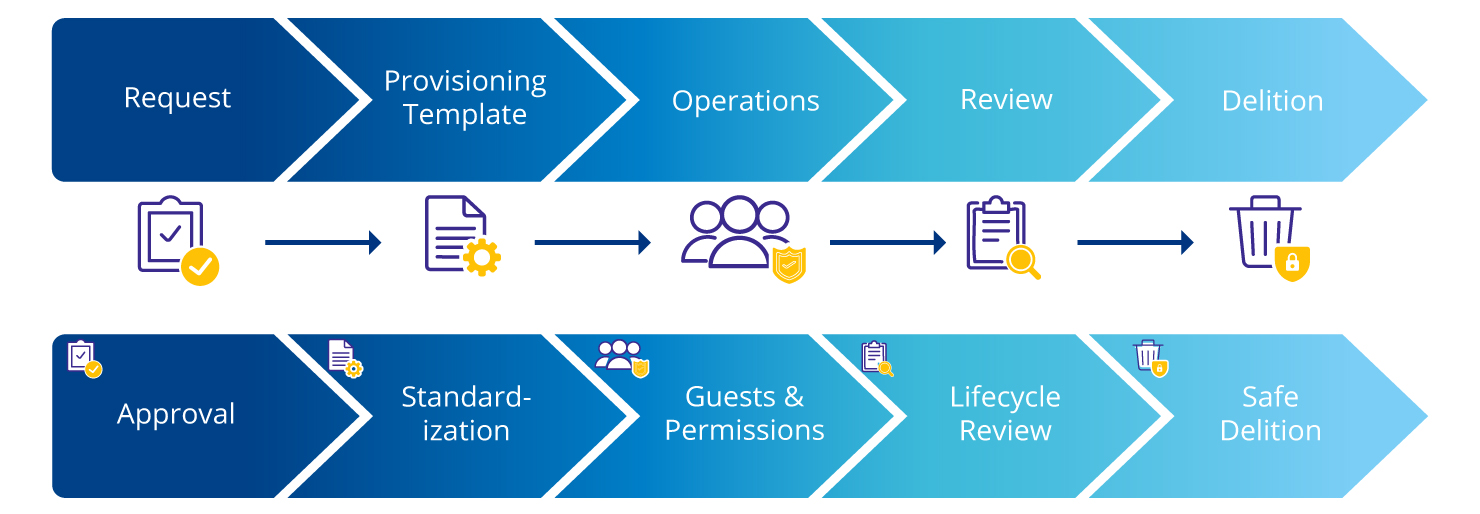
When Microsoft 365 is used in a regulated environment, everyday practices determine the effectiveness of GxP compliance: how workspaces are created, operated, and terminated.
This is exactly where a lifecycle and data management approach comes in. Teams and SharePoint sites, in particular, show how important clearly defined processes are for the creation, use, and closure of workspaces to ensure data integrity, traceability, and controlled access throughout the lifecycle.
Lifecycle and Data Management: Where GxP Makes a Difference in Everyday Life
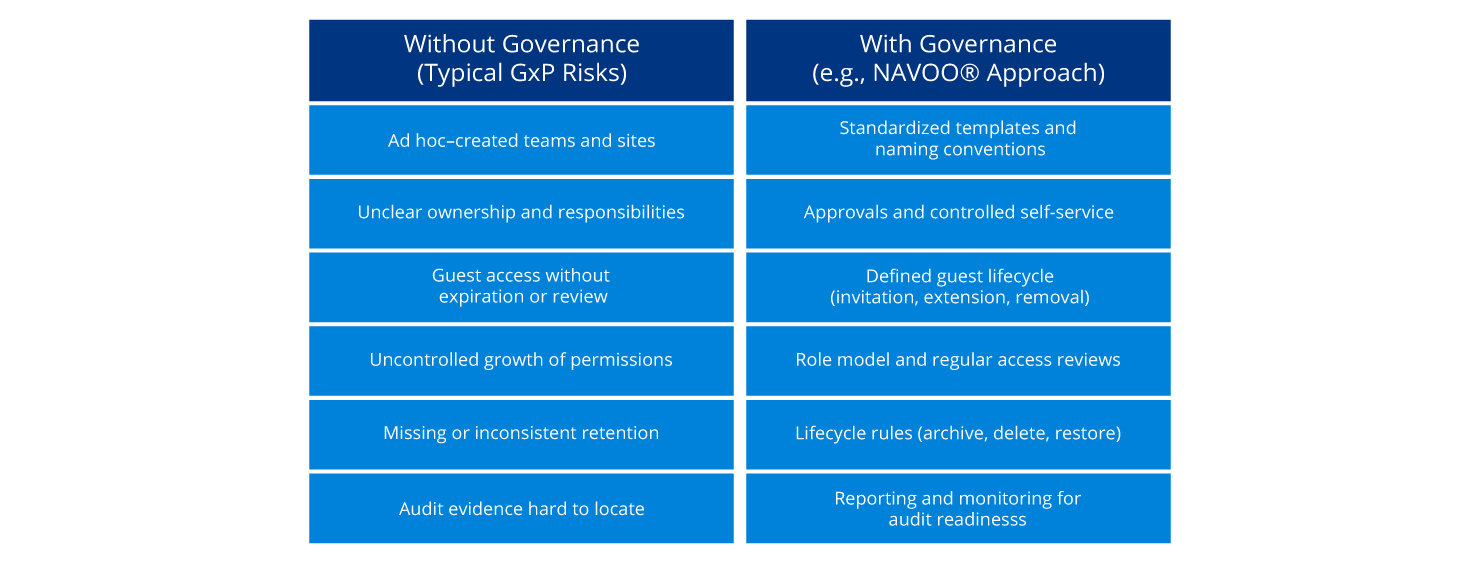
The effectiveness of GxP compliance is demonstrated in day-to-day operations. Without clear rules for the workspace lifecycle, inconsistencies and risks quickly arise. Typical risks without clear governance are particularly evident in the following areas:
- ad hoc created teams and sites
- Unclear responsibilities
- Permanently active guest access without review
- uncontrolled growing authorizations
- missing or inconsistent retention rules
- difficult audit evidence
In contrast, there are structured governance approaches that address precisely these risks:
- standardized templates and naming conventions
- controlled self-service with approvals
- defined guest and authorization lifecycle
- Regular reviews
- Reporting and monitoring
The following comparison shows the concrete effects of these relationships in everyday life:
Conclusion: GxP Compliance in M365 Is Primarily a Question of Governance
Individual functions do not create gxP-compatible collaboration in Microsoft 365. The decisive factor is the interplay of a clearly defined scope, controlled access, traceable reviews, a consistent lifecycle model, and structured data and records management.
In the dynamic cloud environment, in particular, it becomes clear how important transparency and classification are for systematically evaluating changes and integrating them into existing processes.
How NAVOO® Supports M365 Operation
NAVOO® is a governance approach based on Microsoft 365. The solution is not a GxP certificate and does not replace validation, but can help to implement defined governance rules more consistently in operations. The focus here is particularly on practical application in day-to-day operations. While policies and processes are often defined, the challenge lies in their consistent implementation across the entire lifecycle.
Typical support points are:
- standardized provisioning of teams and SharePoint sites, for example, through templates, naming conventions, and clearly defined responsibilities
- Structured guest and authorization management across the entire lifecycle, including invitation, extension, and revocation of access as well as temporary rights to implement the least privilege principle
- Lifecycle functions for workspaces, for example, for archiving, restoration, or rule-based removal
- Data management modules such as duplicate checks and structured archiving approaches, for example, in the context of solutions such as NAVOO® Smart Archive
- Transparency and traceability through reporting, monitoring, and supported review processes to ensure audit readiness
If Microsoft 365 is used or planned in a GxP-related context, a structured assessment of the current situation is recommended. In particular, this involves determining which use cases are in scope, which controls are already established, and where standardized processes or traceable evidence are missing. On this basis, it is also possible to assess whether and to what extent a governance extension, such as NAVOO®, may be useful.
Frequently Asked Questions and Answers About GxP Compliance
-
Is Microsoft 365 automatically GxP-compliant?
No. Microsoft 365 is not automatically GxP-compliant. GxP compliance depends on the specific deployment, established controls and company-specific validation. Organizations are generally guided by regulatory requirements and risk-based procedures, particularly with regard to data integrity.
-
Who is responsible for GxP compliance?
The technical, regulatory and organizational responsibility for GxP compliance always lies with the company itself. Solutions such as NAVOO® can provide support with implementation, but do not perform compliance assessments.
-
What role does Microsoft play in the shared responsibility model?
-
How do Microsoft Teams and SharePoint support the ALCOA+ principles?
-
Which Microsoft 365 functions are particularly relevant for GxP?
The relevant functions include version histories, authorization models, logging (audit logs), retention policies and structured storage via SharePoint and Teams. However, it is crucial that these are embedded in clear governance and process specifications.
-
Can Microsoft 365 be validated for GxP?
In principle, Microsoft 365 can be validated. However, the scope and design of the validation depend on the specific use, the risk assessment and the controls implemented in the company.
-
What role does NAVOO® play in the GxP context?
-
Is NAVOO® a GxP certificate or does it replace validation?
-
How does NAVOO® contribute to data integrity and traceability?


Written by
Felix Stratmann is an expert in technical development and consulting in the area of Microsoft 365. He supports companies in the design and implementation of modern intranet and digital workplace solutions, combining in-depth technical expertise with practical advice. His focus is on the development of scalable solutions based on SharePoint and Microsoft 365 as well as the integration of governance and compliance requirements into existing work environments.